How to get parking mode to work?

Thanks Chuck.

1) This is the battery pack I was looking at but will wait for your delivery today and see what you think.


So of I do get one will probably need an installer to install it (not the same one as last time!!!)

2) To check the last recorded video files the morning after my last drive home the day before can I check this on the app rather than having tk remove the SD card?

Also I didn't think it recorded at all in parking mode and only recorded a clip if there was an impact? So bit confused on that?

3) updating the firmwear is my next task.
I am going to buy another SD card today and try again.
Dont want to take the SD card out again from dash cam as it popped out so fast and took me an hour to find the darn thing.

When I tried to format it once I found it, it said I think that to download the updated software I had to format the sd card to 32gb. Then I tried to do this and I got 2 options a) quick format (but it said this is not recommended) so I went with the one that took a long time. It only got to 2% in 1 hour so left it over night. The night morning it had stayed at 3% and crashed and said failed.

So that's when I ran out of time trying to format it and then update the firmwear.
 
In terms.of the parkijg mode setting that drains the battery the least.
woulsnt it be better to have it on a so called sleeping mode and only awakens to record when theres an impact ie
*Low Power Impact Detection as:
“the camera stays in low-power standby”

Looking at the A329S Manual
That is the true lowest-power mode.
Whereas Low Bitrate mode:
“records video and audio continuously”

Chuck do you have the same dash cam as me?
 
That is what I use. It saves power big time, Low Power Impact Mode. And I use the Geo fence for at home.
 
When I tried to format it once I found it, it said I think that to download the updated software I had to format the sd card to 32gb. Then I tried to do this and I got 2 options a) quick format (but it said this is not recommended) so I went with the one that took a long time. It only got to 2% in 1 hour so left it over night. The night morning it had stayed at 3% and crashed and said failed.
What you are describing is the DEEP FORMAT.
That is not necessary.
The quick format only takes 5 seconds.
Watch this video, how to format SD Card.

 
2) To check the last recorded video files the morning after my last drive home the day before can I check this on the app rather than having tk remove the SD card?

Yes.
 
In terms.of the parkijg mode setting that drains the battery the least.
woulsnt it be better to have it on a so called sleeping mode and only awakens to record when theres an impact ie
*Low Power Impact Detection as:
“the camera stays in low-power standby”
Looking at the A329S Manual
That is the true lowest-power mode.
Whereas Low Bitrate mode:
“records video and audio continuously”

Before proceeding you need to update the firmware first.

Chuck do you have the same dash cam as me?
YES.
 
Please tell me which download I need for my camera?
Either as29s or a329ww?

Apologies if you already mentioned it
 
A329S

Screenshot 2026-05-08 6.29.50 AM.webp
 
Ok thanks.

I spoke to viofo and they told me to use the firmwear for A329WW even though I told them my dash cam was a A329S. They said despite this you have to update firmwear tk the A329ww and said A329WW A329T A329TC are all belong to A329S series.

Where they right? Will I experience issues?

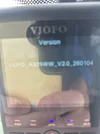
So Ive done what they said and updated the firmwear and now it says this on the camera.

Is this correct and front and rear updated to latest firmwear?
 

Attachments

  • 20260508_143304.webp
    20260508_143304.webp
    59.2 KB · Views: 7
Unfortunately, the entire A329 series of dash cameras have the "A329" marking on the front camera. That further confuses issues since there was and older A329 that is NOT the same as this newer A329 series. The first sub-model offered for sale was the A329S which is why everyone calls this entire series of sub-models an "A329S", but there are several of them [A329S, A329T, A329WW, A329TC, plus other variations].

Your dash camera has the A329WW firmware currently installed in your unit. What additional cameras do you have connected to the front camera? The A329WW has two exterior waterproof cameras like this:
1778253086602.webp


If you have that particular setup, you would install the updated A329WW firmware.

If you have different types of additional cameras, you may need to go through the full boot loader file LD98530A.bin installation for the "correct" sub-model of this dash camera series. Then load the corresponding firmware file for that sub-model of the A329 series.

Your screenshot shows V2.0_260104 which is currently the latest firmware version available for any of the sub-models.
 
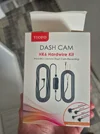
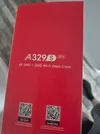
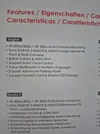
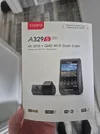
Thanks. Attached is what I bought.

The new firmwear as my last post shows.is working fine and no issues. Hopefully that's the right firewear as viofo were adamant it was. Chuck hopefully can chime in

I dont have the water proof I dont think..just front and rear.
 

Attachments

  • 20260506_145844.webp
    20260506_145844.webp
    123.5 KB · Views: 5
  • 20260506_145832.webp
    20260506_145832.webp
    162 KB · Views: 4
  • 20260506_145827.webp
    20260506_145827.webp
    110.4 KB · Views: 4
  • 20260506_145819.webp
    20260506_145819.webp
    160 KB · Views: 5
  • 20260506_145815.webp
    20260506_145815.webp
    92.8 KB · Views: 5
Also would the rear camera firmwear also have been updated at the same time? The rear camera was connected at the time of the firmwear update on the camera.
 
Do I need to update specifically now the rear camera even though it was connected to the front at the time of the update? And if I do please give me link to exact firmwear for the rear. Thanks all.
 
That is not the A329WW. That looks to be the standard A329S. Where did you originally get the A329WW model number from? Did you add one of the waterproof accessory cameras?
 
Ok im still none the wiser at all. I have read the posts again and still dont know the answer to these questions if anyone would be kind enough to answer please?

1) Do I need to update specifically now the rear camera even though it was connected to the front at the time of the update?

2) if I do please give me link to exact firmwear for the rear.

3) I spoke to viofo and they told me to use the firmwear for A329WW even though I told them clearly my dash cam was a A329S. They said despite this you have to update firmwear to the A329ww and said A329WW A329T A329TC are all belong to A329S series. So the A329WW is the correct firmwear for my dash cam?

4) if not, do I need to now download the A329S firmwear?
 
In relation to question 2. Chuck said

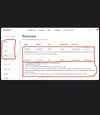
" If you have one standard rear camera you need to install the firmware I’ve circled in red, (see attached screenshot).

https://www.viofo.com/pages/firmware?s=A329S

But there was no attached screenshot in that post which is confusing me.
There is a screenshot later which is what is attaxhed here and I am wondering if this is the firmwear I need to download for the rear camera.?

But now with front camera is updated with the A329ww how do I ensure I only update the rear camera and not the front?
 

Attachments

  • Screenshot_20260508_215950_Chrome.webp
    Screenshot_20260508_215950_Chrome.webp
    53.5 KB · Views: 4
@cartyre

The A329s is the ONLY cam that gets firmware, you just have to install the correct
firmware depending on any additional cams you are using.
The default system is the A329s by itself, OR
the A329s with a Cabin cam, OR
the A329s with a Rear cam, OR
the A329s with a Cabin cam AND and Rear cam.
All the above systems use the same A329s firmware -
NOT the A329T, NOT the A329W, NOT the A329WW, NOT the A329TC.
The link you show above is for the A329TC, You want the A329s.
You are SO close, and believe it or not, you have come a long way from the start.

Use this link for the A329s. https://www.viofo.com/pages/firmware?s=A329S
 
Last edited:
Cartyre,
Chuck McCoy has tried his very best to give you the straight story on what to do with your a329s Dash Cam. He has circled in red the firmware to use. Chuck is very knowledgeable and you should take his advice.
As far as I know the firmware is only for the front A329s unit, not the camera's.
And I just see Finnegan has posted. He also knows the scoop. Read his advice very slowly and follow it to the letter. And stop going down rabbit holes. Your getting to be a ..........
 
Back
Top