Vantrue N4S

@runtohell121 Many of your 1 minute loops are terminated early judging by the low storage size (assuming you are not cycling power on purpose), and sometimes the rear camera completely drops out (like you already said).

Have you tried disconnecting the rear camera completely to see if the problem stops? I would disconnect from the N4S cable side.

I'll try this week as a diagnosis (defeats purpose of 3 channel 🙂), but all my trips during weekday swill be short.
 
My thought is maybe something is wrong with the rear camera causing the issue. It's strange how that camera drops out and some of your recordings on all three cameras are terminated early.
 
My thought is maybe something is wrong with the rear camera causing the issue. It's strange how that camera drops out and some of your recordings on all three cameras are terminated early.

Could be - I'll try it anyways. When dash cams drop off like this, I normally think it would be memory card or the cam itself overheating. Currently I don't see any consistency on when it drops off and sort of ruled out it's not power issue over the past few days.

Or did the bad packaging damaged my N4S sample unit? Highly doubt that lol.

@Jeff_Vantrue - have any idea on why the N4S suddenly drops off/stops recording and the resumes in dual channel mode, without notifying the user.
 
Could be - I'll try it anyways. When dash cams drop off like this, I normally think it would be memory card or the cam itself overheating. Currently I don't see any consistency on when it drops off and sort of ruled out it's not power issue over the past few days.

Or did the bad packaging damaged my N4S sample unit? Highly doubt that lol.

@Jeff_Vantrue - have any idea on why the N4S suddenly drops off/stops recording and the resumes in dual channel mode, without notifying the user.
When the N4S stops recording, you can tell from the recording indicator light and the icon on the screen. We haven’t included a voice alert for this, as most users found it too noisy or disruptive.
could you check whether the rear cable might be a bit loose? Try gently wiggling the cable at both connection points to see if there's any sign of intermittent contact or signal disruption.
 
When the N4S stops recording, you can tell from the recording indicator light and the icon on the screen. We haven’t included a voice alert for this, as most users found it too noisy or disruptive.
could you check whether the rear cable might be a bit loose? Try gently wiggling the cable at both connection points to see if there's any sign of intermittent contact or signal disruption.

I didn't pay attention to the light, especially when the N4S is mounted towards the passenger side.

I've checked the connection the other day when I was swapping out the power cables (12v power adapter / OBD hardwire) between the S1 Pro Max and N4S.

It is probably important to have voice alerts if and when a dash cam stops recording randomly - at least in my view. What if someone had an accident and thinking the dash cam was recording all the time, but in reality it wasn't due to a random fault (e.g. slow card, bad adapters, cables, etc.)?
 
@Jeff_Vantrue

I too am confirming my N4S is dropping out and losing recordings. I am using a Sandisk 128GB High Endurance. It seems the SD card doesn't matter. This is 100% a firmware issue and 0 percent faulty cabling or improper install given @EricSan and @runtohell121 have exact same issue.
 
Thank you for all the feedback. I've already passed this issue along to our tech team for further investigation. As soon as I hear back from them, I’ll get in touch with you right away.
 
When the N4S stops recording, you can tell from the recording indicator light and the icon on the screen. We haven’t included a voice alert for this, as most users found it too noisy or disruptive.
could you check whether the rear cable might be a bit loose? Try gently wiggling the cable at both connection points to see if there's any sign of intermittent contact or signal disruption.
Depending on the location of N4S installation, not all users can see the recording indicator and icons on the screen.
It may be necessary to enable voice notification of the main N4S actions with the ability to disable them in the menu,
for those who are bothered by them.
 
I have not experienced the N4S dropped recordings. I'm using 3 minute loops, and have not yet installed my rear camera.
 
I'm thinking the problem is tied to/triggered by the rear camera since that is the first video file missing from the SD card when it happens. I haven't tried using the N4S without the rear camera, though. Might be an interesting experiment to disconnect the rear camera and see if there are further dropouts...
 
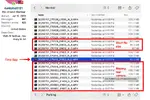
I agree the rear camera is suspicious. I took a look at @runtohell121 's files and it appears all three camera recordings "glitched" before the rear camera actually dropped out.
The 3 files at TS 5:58 PM were all too short, then the front and interior cameras recovered (but the rear camera file was too short), and then the rear camera completely dropped out along with a glitch in the "Date Modified"


screenshot_670.webp
 

Attachments

  • screenshot_670.webp
    screenshot_670.webp
    112.9 KB · Views: 145
Yep, I'm seeing the same thing - filesizes that are too small, then the files drop out next. I think the rear camera is the trigger somehow, it's the first one that glitches.
 
@jsmith Are those parking files using low bit rate recording? The file sizes are all over the place?!
 
@jsmith Are those parking files using low bit rate recording? The file sizes are all over the place?!

Memory card is a Sandisk High Endurance 128GB. The N4 says not to use Sandisk, but the N4S doesn't mention it. I've requested a Vantrue Card. Sandisk has been overwrite formatted twice and card works fine.

That is Normal Recording Folder. 3 Minute Loop Recordings (which is probably not working properly as well... Other's are using 1 Minute). Might explain random file sizes

Low Bitrate Parking files go into their own folder. Don't see issues in Parking Mode (Low Bitrate).

1751989127218.webp
 
My Front Camera 3 minute recordings using 1440P resolution are a consistent 364.9 MB
 
Last edited:
Vantrue 128 GB

I am placing the Vantrue 128GB sd card into the N4S to see if the file sizes become consistent. Temporarily using hte Sandisk 128GB High Endurance in S1 Pro Max. I believe Sandisk isn't compatible with any Vantrue Products after looking on their website.

We shall see what happens with missing footage and files sizes.
 
Maybe I’ll swap the Vantrue 128gb from the S1 Pro Max to the N4S…though both are Vantrue 128gb memory cards lol.
 
Back
Top