Vueroid S1-4K Improvement Wishlist

In the case of an external waterproof rear camera, it may be possible to cover the areas that are blocked by the bed of a pickup truck. However, for a typical 2-channel dashcam setup, the rear camera is optically limited and will inevitably cover a viewing area similar to that of the S1 4K rear camera.
If the camera angle is tilted upward, more of the sky can be captured and the pickup truck bed may appear smaller relative to the overall frame. However, in that case, the areas on both sides of the bed will no longer be visible.

In practice, this would require using a rearview backup camera with a monitor together. However, I’m not yet certain whether using two separate rear cameras in this way is truly appropriate or practical.
An external rear camera for a dashcam is designed to remain powered on and record continuously in all driving conditions, whereas a rear backup camera for viewing purposes is activated only when the vehicle is in reverse, providing a visual aid through a monitor for parking safety.

Even if we were to develop such a product, it would need to integrate these two very different applications into a single external rear camera. As you can see, there are many factors that would need to be carefully considered.

While it might be easy to release a product simply to satisfy the idea of having a waterproof external rear camera, I believe that a manufacturer’s responsibility is to carefully evaluate efficiency and suitability and to develop a solution that can be used effectively by a wider range of customers.

Have a good day

Thank you for the reply I think the topic changed by a misunderstanding.

A reversing camera I agree is not what a dash cam is consider when making a purchase.

My idea was to just extend the normal dash cam to outside so it could be connected to the rear of the vehicle. That way the tray when loaded would not block the view of the rear camera.
I suggested waterproof because it would probably be mounted in the open air.

Cheers
 
I would be interested to know what the sales numbers are from other manufacturers for an external, waterproof dashcam for the rear of any vehicle. As for pickup trucks, I live in a rural area and have yet to see an external rear camera on a truck, and I am looking for them. Around here, an external rear camera is not going to last at all, given how most of these trucks are used for farming, work, hauling, etc. The rich people who have expensive trucks are unlikely to install an external dashcam, as it will 'ruin' the look of the truck. Very few people really want to drill a hole in the cab or bed/tailgate.

.
.
My idea was to just extend the normal dash cam to outside so it could be connected to the rear of the vehicle. That way the tray when loaded would not block the view of the rear camera.
I suggested waterproof because it would probably be mounted in the open air.

Cheers

Are you asking that the S1 4K front-facing camera be in a waterproof housing and mounted on the rear bumper of the pickup truck? Is that correct? The S1 4K front-facing camera, as it is now, can be placed inside the flat-glassed rear window and work quite well. Due to the GPS mount, there is ample room to adjust the lens.
 
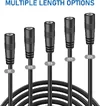
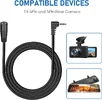
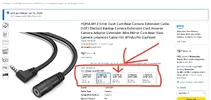
AFAIK the extension cable for the interior camera is available only in 3m length.

I wonder if two extension cables can be connected together if needed (provided that one wants to install the interior camera near the rear window, and the 3+1 m cabling is not enough)?
 
I wonder if two extension cables can be connected together if needed (provided that one wants to install the interior camera near the rear window, and the 3+1 m cabling is not enough)?
 

Attachments

  • 4 .webp
    4 .webp
    161.8 KB · Views: 33
  • 3 .webp
    3 .webp
    71.4 KB · Views: 28
  • 2 .webp
    2 .webp
    108.1 KB · Views: 28
  • 1 .webp
    1 .webp
    50.8 KB · Views: 28
  • 5ft, 10ft, 15ft, 20ft, 25ft .webp
    5ft, 10ft, 15ft, 20ft, 25ft .webp
    119.8 KB · Views: 40
Long time no see James, Jesse, CTO Kim, and team.
@qusejr2 @VUEROiD @meyelow_Vue
I know you guys are busy with a thousand different things, but I noticed something when connecting S1-4K Infinite to a Dash Cam Battery Pack.

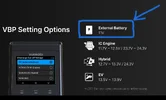
The current firmware setting for VBP (vehicle battery protection) for Dash Cam Cam Battery Packs, (external battery) is 11.0V.
Dash Cam Battery Packs discharge all the way down to 10.0V.
This means the current firmware setting will pre-maturely cut off power to S1-4K before 100% capacity has been drained from the Dash Cam Battery Pack.
Based on my testing this will reduce parking mode operation run time by 30 Minutes to 90 Minutes based on channel configuration, (1/2/3 CH).
Because S1-4K has ELPID (Extreme Low Power Impact Detection) at 1mA, or below this could make an even bigger difference in parking mode operation run time.

I would like to request an additional VBP firmware setting; “OFF”
OFF will completely disable voltage cut-off, and allow full capacity of the Dash Cam Battery Pack to power the camera, and provide the longest possible parking mode operation run time.
Basically, the current 11.0V setting when used with a Dash Cam Battery Pack is like leaving two sips of Soju in the bottle.
I want my last two sips. lol
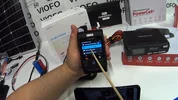
Skip to 30:45 for a video explanation of what I’m talking about;


-Chuck
 

Attachments

  • VBP .webp
    VBP .webp
    52.9 KB · Views: 28
  • Vehicle Battery Protection .webp
    Vehicle Battery Protection .webp
    117.3 KB · Views: 28
Long time no see James, Jesse, CTO Kim, and team.
@qusejr2 @VUEROiD @meyelow_Vue
I know you guys are busy with a thousand different things, but I noticed something when connecting S1-4K Infinite to a Dash Cam Battery Pack.

The current firmware setting for VBP (vehicle battery protection) for Dash Cam Cam Battery Packs, (external battery) is 11.0V.
Dash Cam Battery Packs discharge all the way down to 10.0V.
This means the current firmware setting will pre-maturely cut off power to S1-4K before 100% capacity has been drained from the Dash Cam Battery Pack.
Based on my testing this will reduce parking mode operation run time by 30 Minutes to 90 Minutes based on channel configuration, (1/2/3 CH).
Because S1-4K has ELPID (Extreme Low Power Impact Detection) at 1mA, or below this could make an even bigger difference in parking mode operation run time.

I would like to request an additional VBP firmware setting; “OFF”
OFF will completely disable voltage cut-off, and allow full capacity of the Dash Cam Battery Pack to power the camera, and provide the longest possible parking mode operation run time.
Basically, the current 11.0V setting when used with a Dash Cam Battery Pack is like leaving two sips of Soju in the bottle.
I want my last two sips. lol
Skip to 30:45 for a video explanation of what I’m talking about;


-Chuck
recently we add new funtion which can run normal parking mode until cut off volatage , and then one reach the cut off volatage , S1 will turn to ELPM mode .
so in case of Battery pack usage , if user set the power off voltage to 11.0 and set the low poer mode entry time to Auto , S1 will run normal parking mode until 11.0 V ,and then change mode to ELPM .
and also I know your point. we will consider this point for the next release .
within this week , we will release new firmware .
thank for your interesting and suggestion .
 
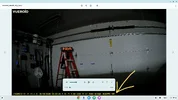
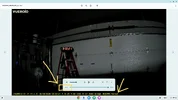
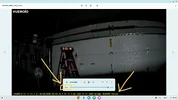
HDR Timer results in 4 Second recording lapse during transition, (8 Seconds per day).
Any lapse in recording is unacceptable.
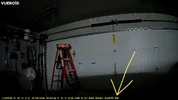
Here’s what the recording lapse looks like, (occurs at 9:00:21AM)
LCD Screen on S1-4K goes black during recording lapse.

Can this be be fixed?
@VUEROiD
@qusejr2
@meyelow_Vue


Attachments

  • LCD Screen During Recording Lapse .webp
    LCD Screen During Recording Lapse .webp
    48.2 KB · Views: 1
  • 21 Seconds .webp
    21 Seconds .webp
    104.3 KB · Views: 1
  • 25 Seconds .webp
    25 Seconds .webp
    117.2 KB · Views: 1
  • APP Version .webp
    APP Version .webp
    19.8 KB · Views: 1
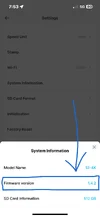
  • Firmware Version 1.4.2 .webp
    Firmware Version 1.4.2 .webp
    31.9 KB · Views: 1
HDR Timer results in 4 Second recording lapse during transition, (8 Seconds per day).
Any lapse in recording is unacceptable.
Here’s what the recording lapse looks like, (occurs at 9:00:21AM)
LCD Screen on S1-4K goes black during recording lapse.

Can this be be fixed?
@VUEROiD
@qusejr2
@meyelow_Vue

Isnt Viofo taking 20 seconds changing over with no recording?
 
HDR Timer results in 4 Second recording lapse during transition, (8 Seconds per day).
Any lapse in recording is unacceptable.
Here’s what the recording lapse looks like, (occurs at 9:00:21AM)
LCD Screen on S1-4K goes black during recording lapse.

Can this be be fixed?
@VUEROiD
@qusejr2
@meyelow_Vue


My question would be: "Does changing HDR/SDR type modes result in closing a file and opening a new file?"
 
for change ISP mode , we have to stop recoding and reinit ISP , So S1 close current file and open new file with new mode . we try to be shorten loss period . current is our best .
My question would be: "Does changing HDR/SDR type modes result in closing a file and opening a new file?"
yes.. close current file , open new file with new mode
 
@qusejr2 said:
for change ISP mode , we have to stop recoding and reinit ISP , So S1 close current file and open new file with new mode . we try to be shorten loss period . current is our best .

@Chuck McCoy said:
I set HDR timer for 9:00AM.
S1-4K stopped recording at 9:00:18AM.
It started a new 393.8MB file that is only 2 Seconds long 9:00:18AM to 9:00:21AM.
It started a new 393.8MB file that is 1 Minute long at 9:00:25AM.
From 9:00:21AM to 9:00:25AM S1-4K is not recording for 4 Seconds.
This is unacceptable.
What if there is an incident in those 4 Seconds that S1-4K is not recording.
The customer’s expectation is the camera will not stop recording.

1.) Can we just have one single ISP video setting for day & night so this 4 Second recording lapse will not occur?
-
-
 

Attachments

  • 4 .webp
    4 .webp
    115.3 KB · Views: 2
  • 3 .webp
    3 .webp
    102.9 KB · Views: 1
  • 2 .webp
    2 .webp
    106 KB · Views: 2
  • 1 .webp
    1 .webp
    98.4 KB · Views: 2
@qusejr2 said:
for change ISP mode , we have to stop recoding and reinit ISP , So S1 close current file and open new file with new mode . we try to be shorten loss period . current is our best .

@Chuck McCoy said:
I set HDR timer for 9:00AM.
S1-4K stopped recording at 9:00:18AM.
It started a new 393.8MB file that is only 2 Seconds long 9:00:18AM to 9:00:21AM.
It started a new 393.8MB file that is 1 Minute long at 9:00:25AM.
From 9:00:21AM to 9:00:25AM S1-4K is not recording for 4 Seconds.
This is unacceptable.
What if there is an incident in those 4 Seconds that S1-4K is not recording.
The customer’s expectation is the camera will not stop recording.

1.) Can we just have one single ISP video setting for day & night so this 4 Second recording lapse will not occur?
-
-
so user can use non timed configuration , we provide this option(timed) for user convenience.
user can use linear only , or HDR only , or IPC only . the best license plate capture is timed IPC , but it has shortcome ( 8 seconds video loss)
Do you think we remove timed feature if we can not avolid video loss during change mode ?
linear and HDR is totall different operation as you konw , the output of image sensor is different .
we will add comments the risk of video loss with timed configuration . this is the our best I think.
we cannot overcome .
 
@qusejr2 said:
Do you think we remove timed feature if we can not avolid video loss during change mode ?

@Chuck McCoy said
All it’s going to take is one person experiencing this malfunction, and make a video about it.
It may tarnish / ruin the reputation you’ve worked so hard for.
Here's an example.


This is why I ask for;
1.) Can we just have one single ISP video setting for day & night so this 4 Second recording lapse will not occur?
 
@qusejr2 said:
Do you think we remove timed feature if we can not avolid video loss during change mode ?

@Chuck McCoy said
All it’s going to take is one person experiencing this malfunction, and make a video about it.
It may tarnish / ruin the reputation you’ve worked so hard for.
Here's an example.


This is why I ask for;
1.) Can we just have one single ISP video setting for day & night so this 4 Second recording lapse will not occur?
Sorry for that. we cannot . it is possible if we remove time feature . and the default setting is HDR without timed.
 
@qusejr2 said:
Sorry for that. we cannot . it is possible if we remove time feature . and the default setting is HDR without timed.

@Chuck McCoy said:
I guess the technology does not exist for one single ISP video setting for day & night.
Maybe STARVIS 3 can fix?
 
@qusejr2 said:
Sorry for that. we cannot . it is possible if we remove time feature . and the default setting is HDR without timed.

@Chuck McCoy said:
I guess the technology does not exist for one single ISP video setting for day & night.
Maybe STARVIS 3 can fix?
accroding to the Sony , it overcome the side effect of HDR(motion blur), we can come to know August or September.
Some engineer doesn't expect the Starvis3 cause clearHDR not so good as Sony promot
Starvis3 sensoer sampe is ready , and SOC vendor start to evaluate it and builing the SDK ( image sensor driver and ISP pipeline) .
 
@qusejr2 said:
Sorry for that. we cannot . it is possible if we remove time feature . and the default setting is HDR without timed.

@Chuck McCoy said:
I guess the technology does not exist for one single ISP video setting for day & night.
Maybe STARVIS 3 can fix?
Without an overall understanding of image processing concepts and the technical limitations of video tuning, the questions and answers could go on endlessly.
I believe that judging whether image quality is “good” or “bad” is ultimately subjective (meaning there is no absolute standard). The closest thing we have to a common benchmark is probably license plate readability.
That is also why I prefer using the term “optimization” when talking about video quality, because advantages and disadvantages always coexist.
Even when Starvis 3 becomes available, I do not believe it will be the ultimate solution — unless cameras become capable of seeing exactly like the human eye.

Timed IPC is optional, as it may provide better results than using a single option continuously.
If the user is concerned about losing approximately 8 seconds per day, there is simply no need to enable this option. That’s all.
 
Timed IPC is optional, as it may provide better results than using a single option continuously.
If the user is concerned about losing approximately 8 seconds per day, there is simply no need to enable this option. That’s all.
Regarding video loss when the timer triggers:
Manufacturers need to explicitly mention this in the manual.
This ensures the user is aware of what to expect and can then decide—based on that information—whether or not to use the timer.
 
Back
Top