Vueroid S1-4K Infinite - Test & Review PP

Wi-Fi TRANSFER SPEED TEST

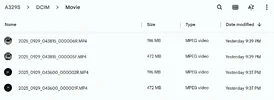
Q: What is the Wi-Fi Transfer Speed to download a 1 Minute video clip?
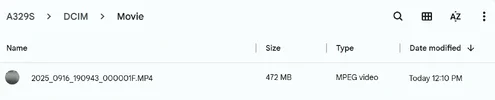
Q: How does it compare to A329S?
A:

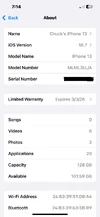
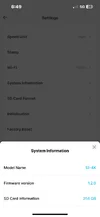
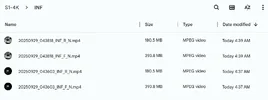
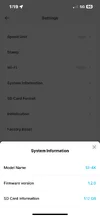
394MB = 22 Seconds S1-4K
472MB = 14.5 Seconds A329S

18MB/s = S1-4K
33MB/s = A329S


Attachments

  • 472MB 1 Minute A329S .webp
    472MB 1 Minute A329S .webp
    18.4 KB · Views: 112
  • 394MB 1 Minute S1-4K .webp
    394MB 1 Minute S1-4K .webp
    17.1 KB · Views: 134
  • iPhone 13 .webp
    iPhone 13 .webp
    46.9 KB · Views: 115
  • A329S Firmware .webp
    A329S Firmware .webp
    48.3 KB · Views: 111
  • S1-4K Firmware .webp
    S1-4K Firmware .webp
    25 KB · Views: 143
Yes, startup recording is about as 'instant' as a person could hope for. After startup, if the S1-4K is busy with housekeeping, a message is displayed on the LCD, and pressing a button triggers an audible alert. Regardless, the S1-4K is recording.

At the first startup of the day, the GPS gets its orientation and sync for that area. This may take about a minute. After that, subsequent startups will sync with GPS more quickly, and of course, there is an audible alert when the GPS is synced.

The delay in showing the 'data line' is something we discussed during testing. As I recall, more emphasis was placed on getting an image quickly to the video stream. After that, the other information is displayed. If it's the first startup for the day, the GPS may be a little slower, but it will eventually display the GPS coordinates.

Sometimes there are tradeoffs. One brand, after 20 seconds, offers a video that includes both relevant and non-relevant data. Alternatively, with the S1-4K, you can get a near-instant video to record your car leaving the house or parking lot, with the data available 10 seconds later. People have to weigh what is more important to them.
I don’t think I could have written it any better myself. Thank you very much. @lufa6977
 
Here’s a random screenshot showing the difference between S1-4K & A329S IR Interior FOV.

Both are able to capture plates of passing cars;
CA Plate# 9CMF296 2022 Tesla Model 3 Long Range

145° Measured Horizontal FOV S1-4K
179° Measured Horizontal FOV A329S

I’ll follow up with night time footage in IR B&W, and also show how accurate / fast each camera is at transitioning from B&W to Full Color, and back to B&W.

1.) S1-4K IR Interior .webp

2.) A329S IR Interior .webp

3.) S1-4K IR Interior .webp

4.) A329S IR Interior .webp


Here’s a photo showing how both IR Interior cameras are mounted;
Nobody ask what the star trek tribble is, (it’s a dead cat for wind noise). lol

5.) Mounting Location .webp
 

Attachments

  • Out Of Your Vulcan Mind .webp
    Out Of Your Vulcan Mind .webp
    55.4 KB · Views: 138
S1-4K vs. A329S - Power Consumption / Heat Signature / Parking Mode Wake Up Speed Comparison

Q: What is the difference between S1-4K vs. A329S?
1.) Power Consumption: ELPM (Extreme Low Power Mode) vs. LPID (Low Power Impact Detection)
2.) Heat Signature: ELPM vs. LPID
3.) Parking Mode Wake Up Speed Test: ELPM vs. LPID

A:
POWER CONSUMPTION: ELPM vs. LPID
1mA x 12.6 Volts = 0.0126 Watts S1-4K
35mA x 12.6 Volts = 0.441 Watts A329S

LPID 35mA vs. ELPM 1mA .webp


HEAT SIGNATURE: ELPM vs. LPID - Garage Ambient Temperature 81℉ (27℃)
85.7℉ (29.8℃) S1-4K
92.2℉ (33.4℃) A329S
6.5℉ (3.6℃) A329S Hotter

1.) S1-4K Front 86℉ (30℃).webp
2.) A329S Front 90℉ (32℃) .webp

3.) S1-4K Right Does Not Register .webp
4.) A329S Right 91℉ (33℃) .webp

5.) S1-4K Left Does Not Register .webp
6.) A329S Left 92℉ (33℃) .webp


PARKING MODE WAKE UP SPEED TEST:
1.11 Seconds A329S LPID
1.18 Seconds S1-4K ELPM

TESTING NOTE: Performing the parking mode wake up test is extremely difficult because it requires me to start the clock, and trigger an impact at exactly the same time.
This introduces my own human error of reaction times into the test data.
I practiced this around 10 times, and when I got it down I performed multiple tests to get an average time for each camera.
We need these results to be confirmed & verified by other testers.
I can see the clock on the S1-4K at 0.87 Seconds, but it’s so dark I don’t think its useful, so I’m going with 1.18 Seconds when the image illuminated to almost full brightness.
Check out the videos to see what I mean.

LMAO! I just watched the Sony Action Cam footage in 1/4 slow motion, and it looks like I start the clock about 0.25 Seconds after I slap the table.
Man, I’m way off. lol

S1-4K 0.87 Seconds .webp

S1-4K 1.18 Seconds .webp

A329S 1.11 Seconds .webp


Last edited:
WAKE UP SPEED TEST:
1.11 Seconds A329S
1.18 Seconds S1-4K

TESTING NOTE: Performing the parking mode wake up test is extremely difficult because it requires me to start the clock, and trigger an impact at exactly the same time.
This introduces my own human error or reaction times into the test data.
I practiced this around 10 times, and when I got it down I performed multiple tests to get an average time for each camera.
We need these results to be confirmed & verified by other testers.
I can see the clock on the S1-4K at 0.87 Seconds, but it’s so dark I don’t think its useful, so I’m going with 1.18 Seconds when the image illuminated to almost full brightness.
Check out the videos to see what I mean.

LMAO! I just watch the Sony Action Cam footage in 1/4 slow motion, and it looks like I start the clock about 0.25 Seconds after I slap the table.
Man, I’m way off. lol
For a start, they're both so close to 1-second that in practical terms it's not worth worrying about the difference.

However, if you want to be more accurate you could try this:
1. Set the timer running and start the action camera
2. Bang the table within clear view of the action camera (this gives you the Impact Time)
3. Review the dashcam footage (this gives you the Record Time)
4. Wake-up Duration = Record Time - Impact Time

Question > Is the wake-up duration different if the S1-4k or A329S are in 1CH, 2CH or 3CH mode? Do all channels wake up at the same time?
 
However, if you want to be more accurate you could try this:
I also tried this method around ten times too.
However, I decided to go with the way I posted so the reader doesn’t have to do math. Lol

Question > Is the wake-up duration different if the S1-4k or A329S are in 1CH, 2CH or 3CH mode? Do all channels wake up at the same time?
That’s a good question.
Let me connect all remote cameras, and redo the test.
 
hmmmmm, should we carry this product in Canada?
Are you thinking out loud for a reason? Have you had hands-on experience with it yet?

You should know your customers better than anyone else - will they go for it?
 
Are you thinking out loud for a reason? Have you had hands-on experience with it yet?

You should know your customers better than anyone else - will they go for it?
I have had a unit since June....... I am familiar with it.
 
@TonyM
Q: Does S1-4K Rear & IR Interior cameras wake up from ELPM parking mode same time as the Front camera?
A: No
The Rear camera wakes up 0.19 Seconds AFTER the Front Camera.
The IR Interior camera wakes up 0.09 Seconds BEFORE the Front Camera

Q: What about the A329S Rear & IR Interior cameras?
A: The Rear camera wakes up same time as Front.
The IR Interior test will have to wait a bit because I only have one, and it’s installed in my car.

S1-4K Front .webp

S1-4K Rear  .webp

S1-4K Interior .webp

A329S Front .webp

A329S Rear .webp


Here’s the parking mode videos from each camera, and the video from the “control” Sony Action Cam;

 
S1-4K vs. A329S - Normal / Driving Mode - Power Consumption & Heat Comparison

Q: What is the difference between S1-4K 3CH & A329S 3CH in power consumption, and heat signature in Normal / Driving Recording Mode, (daytime driving conditions).
A: See Below

S1-4K Settings;
3CH Front + Rear + IR Interior
Firmware 1.2.0
256GB Vueroid SD Card
Wi-Fi Off
LCD Screen Off
Maximum Bitrate
Driving Recording Only Memory Allocation (to prevent going into parking mode)
HDR On (default)
IR LED’s Off (there’s no On / Off / Auto setting so I had to put a light in front of the interior camera light sensor to make sure they did not illuminate)

A329S Settings;
3CH Front + Rear + IR Interior
Firmware V1.2_250708
256GB Viofo SD Card
Wi-Fi Off
LCD Screen Off
Maximum Bitrate
HDR Off (front & rear)
HDR On (interior)
IR Interior LED’s Off

Test Configuration .webp


I let the both cameras operate in normal / driving recording mode for 1 hour.
I used the MIN / MAX / AVG function on my Fluke 115 & 117 to get the average amperage / current draw.

POWER CONSUMPTION:
626mA x 12.6V = 7.9 Watts (S1-4K 3CH)
446mA x 12.6V = 5.6 Watts (A329S 3CH)
2.3 Watts More S1-4K

626mA x 12.6V = 7.9 Watts .webp

446mA x 12.6V = 5.6 Watts .webp


HEAT SIGNATURE (highest observed temperature)
Garage Ambient Temperature 76℉ (24℃)
147℉ (64℃) A329S
166℉ (75℃) S1-4K
19℉ (11℃) S1-4K Hotter

S1-4K Front 125℉ (52℃) .webp
A329S Front 125℉ (52℃) .webp

S1-4K Right 150℉ (66℃) .webp
A329S Right 146℉ (64℃) .webp

S1-4K Left 162℉ (72℃) .webp
A329S Left 141℉ (61℃) .webp
 

Attachments

  • IR LED's Off .webp
    IR LED's Off .webp
    58 KB · Views: 111
Last edited:
BOOTUP SPEED TEST

Q: How long does it take S1-4K to start recording when powered on?
One of our primary goals was to start recording as quickly as possible after power is applied, ensuring continuous recording even in extreme situations.
This fast-recording feature was implemented specifically to achieve that objective.
The fast startup time of the S1-4K is a big difference. I can pull out of my driveway and potentially hit (or be hit by) another car long before the A329S has started recording.
sooooooo fast start
LS technology ( Lightning Start )

 
Q: What is the best way to evaluate / compare image quality, and HDR performance?
A: Of course we all know it’s by gathering “side by side” real world driving test footage with both the camera, and subject moving.

Before I head out, and gather driving test footage I like to perform useless lighting experiments in my garage to satisfy my own curiosity.
They’re mostly a waste of time so don’t pay too much attention.

Since S1-4K has 3 different / separate “Video Enhancing” modes;
1.) HDR (default)
2.) HDR + IPC (infinite plate capture)
3.) Normal (HDR Off)
I mounted (3) S1-4K units on my test rig along with an A329S 2CH Rear.
The S1-4K that’s set to HDR + IPC is in 2CH Rear configuration.
The other S1-4K’s are in 1CH configuration.

All Front cameras have CPL Filters installed.
Since there’s no CPL Filter for the S1-4K Rear camera I removed the CPL Filter on the A329S Rear camera for this comparison.
I also omitted both IR Interior cameras for this comparison.

SETTINGS:

S1-4K;
Max Bitrate
Front File Size: 394MB = 1 Minute = Approx 48Mbps
Rear File Size: 181MB = 1 Minute = Approx 22Mbps
Unit 1: HDR + IPC
Unit 2: HDR
Unit 3: Normal (HDR Off)
Firmware: 1.2.0

A329S;
Max Bitrate
Front File Size: 472MB = 1 Minute = Approx 66Mbps
Rear File Size: 196MB = 1 Minute = Approx 27Mbps
HDR On (front & rear)
Firmware: V1.2_250708

Test Rig 1 .webp

Test Rig 2 .webp

Test Rig 3 .webp

Test Rig 4 .webp
 

Attachments

  • S1-4K - 1 Minute File Size (front & rear) .webp
    S1-4K - 1 Minute File Size (front & rear) .webp
    43.9 KB · Views: 123
  • A329S - 1 Minute File Size .webp
    A329S - 1 Minute File Size .webp
    48.6 KB · Views: 97
  • S1-4K Firmware .webp
    S1-4K Firmware .webp
    24.8 KB · Views: 117
  • A329S Firmware .webp
    A329S Firmware .webp
    50.5 KB · Views: 101
Last edited:
STATIONARY HDR COMPARISON (front cameras only)

In this post I’ll be comparing (4) FRONT cameras, (rear cameras next post);
1.) S1-4K HDR (default)
2.) A329S HDR On
3.) S1-4K HDR + IPC
4.) S1-4K Normal (HDR Off)

SETTINGS:

S1-4K;
Max Bitrate
Front File Size: 394MB = 1 Minute = Approx 48Mbps
Rear File Size: 181MB = 1 Minute = Approx 22Mbps
Unit 1: HDR + IPC
Unit 2: HDR
Unit 3: Normal (HDR Off)
Firmware: 1.2.0

A329S;
Max Bitrate
Front File Size: 472MB = 1 Minute = Approx 66Mbps
Rear File Size: 196MB = 1 Minute = Approx 27Mbps
HDR On (front & rear)
Firmware: V1.2_250708

NOTE:
All Front cameras have CPL Filters installed.
Plate# 8GJR413 is a genuine / authentic license plate.
Plate# PANZER PLATFORM is a novelty / replica.

In these 4 photos my flashlight is focused on Plate# 8GJR413.

S1-4K - Front (HDR)  1 .webp

A329S - Front  1 .webp

S1-4K - Front (HDR + IPC)  1 .webp

S1-4K - Front (Normal)  1 .webp


In these 4 photos my flashlight is focused on the VUEROID “sign” attached to the metronome.

S1-4K - Front (HDR) 2 .webp

A329S - Front 2 .webp

S1-4K - Front (HDR + IPC) 2 .webp

S1-4K - Front (Normal) 2 .webp


Here’s the 1 Minute videos the screenshots were taken from;

Here’s a video explanation how I control the lighting for this comparison;
 
Last edited:
STATIONARY HDR COMPARISON (rear cameras only)

In this post I’ll be comparing (2) Rear cameras;
1.) S1-4K Rear (HDR + IPC)
2.) A329S Rear (HDR On)

SETTINGS:

S1-4K;
Max Bitrate
Front File Size: 394MB = 1 Minute = Approx 48Mbps
Rear File Size: 181MB = 1 Minute = Approx 22Mbps
Unit 1: HDR + IPC
Unit 2: HDR
Unit 3: Normal (HDR Off)
Firmware: 1.2.0

A329S;
Max Bitrate
Front File Size: 472MB = 1 Minute = Approx 66Mbps
Rear File Size: 196MB = 1 Minute = Approx 27Mbps
HDR On (front & rear)
Firmware: V1.2_250708

NOTE:
Since there’s no CPL Filter for the S1-4K Rear camera I removed the CPL Filter on the A329S Rear camera for this comparison.
Plate# 8GJR413 is a genuine / authentic license plate.
Plate# PANZER PLATFORM is a novelty / replica.

In these 2 photos my flashlight is focused on Plate# 8GJR413.

S1-4K - Rear (HDR + IPC) 1 .webp

A329S - Rear 1 .webp


In these 2 photos my flashlight is focused on the VUEROID “sign” attached to the metronome.

S1-4K - Rear (HDR + IPC) 2 .webp

A329S - Rear 2 .webp


Here’s the 1 Minute videos the screenshots were taken from;

Here’s a video explanation how I control the lighting for this comparison;
 
Last edited:
i have one question
s1 4k 1ch bitrate
Front File Size: 394MB = 1 Minute = Approx 55Mbps

when s1 4k use 2ch and 3ch
his front file size is still 394mb 1min?
 
i have one question
s1 4k 1ch bitrate
Front File Size: 394MB = 1 Minute = Approx 55Mbps

when s1 4k use 2ch and 3ch
his front file size is still 394mb 1min?
See POST #2

1.) The short answer is the Bitrate does not drop when adding channels.
2.) Also I think I see a typo, it should be 48Mbps not 55Mbps.

Maximum Bitrate (set to high):
53 Mbps 1CH Front (4K60fps)
48 Mbps 1CH Front (4K30fps)
48 Mbps 2CH Front (4K60fps)
48 Mbps 3CH Front (4K30fps)
22 Mbps 3CH Rear (2K30fps)
15 Mbps 3CH IR Interior (1080p30fps)

1 Minute File Size;
435MB 1CH Front (4K60fps)
394MB 1CH Front (4K30fps)
394MB 2CH Front (4K60fps)
394MB 3CH Front (4K30fps)
181MB 3CH Rear (2K30fps)
123MB 3CH IR Interior (1080p30fps)
 
Back
Top