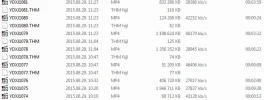
Hey
@cpurage, first of all thx 4 the custom firmware. I made a little test today and got the same results with the bitrates and file splittings...The resolution was set to 2k, and after the split the second file was at just ~28 Mbit and ~ 1 minute. So, after then I set it to 1080p@60fps, and as you can see it at the attached jpg, the first file was YDXJ1074.mp4 with a 13 sec duration, but at ~43 Mbit. The second file is YDXJ1075.mp4 at ~28 Mbit, but it is a 2 GB file...and so on...BUT and this is important, files were missing during a continuous recording. It is about a ~ 15 mins disappeared 1080p@60 fps footage...The creation times are irrelevant and non exact (!), because my ride was ~ 15 mins long between YDXJ1076.mp4 and YDXJ1078.mp4, but the duration is just 6:30 mins...One more odd problem: just look the files YDXJ1080.mp4 and YDXJ1081.mp4 and the bitrates and durations, the record was continuous of course...Same results with the battery in-out cheat
🙂
I hope these details will help you and other custom firmware coders
🙂
Any idea?
First of all Tell me what kind of MicroSD card you are using, this firmware is customized for FAST MicroSD cards as UHS-I or UHS-II with speeds of at least 50-70 Mbps Write speed, you can even use x633 UHS-I which is with guranteed write speed 90 Mbps.
BUT there is no need of my ROM anymore
😀 😀 😀, please use the stock one from the Xiomi official web site for your camera version and just use this script which enables all the
VIDEO resolutions ONLY which can be selected through the app to the following Bitrate speeds:
#YiHyper-movie script by cpurage for 1_2_12 stock firmware
#set bitrate 848x480 240fps 45Mbps
writew 0xC05C28A2 0x4248
#set bitrate 1280x720 48fps 50Mbps
writew 0xC05C25A2 0x4248
#set bitrate 1280x720 60fps 50Mbps
writew 0xC05C2122 0x4248
#set bitrate 1280x720 120fps 45Mbps
writew 0xC05C2812 0x4234
#set bitrate 1280x960 48fps 50Mbps
writew 0xC05C2542 0x4248
#set bitrate 1280x960 60fps 50Mbps
writew 0xC05C2272 0x4248
#set bitrate 1920x1080 24fps 50Mbps
writew 0xC05C2482 0x4248
#set bitrate 1920x1080 30fps 50Mbps
writew 0xC05C1F72 0x4248
#set bitrate 1920x1080 48fps 50Mbps
writew 0xC05C2452 0x4248
#set bitrate 1920x1080 60fps 50Mbps
writew 0xC05C1EE2 0x4248
#set bitrate 2304x1296 30fps 50Mbps
writew 0xC05C1EB2 0x4248
#t ia2 -adj tidx [ev_idx][nf_idx][shutter_idx]", "-1 disable"
#looks like the values are between 0-16383 (0x0000-0x3FFF)
#If you want to set noise reduction value to 2048 just remove the hash key from the row below and for all the resolutions you will have sharpness as craze
#t ia2 -adj tidx -1 2048 -1
So you see that you can even set the noise reduction value to whatever you want, I tried 1024 and in the night there is too much noise in the video so 2048 is a bit better, but this setting is not good for night video even if the Auto low light is turned on !
And here is the file it self: