Xiaomi Yi Custom firmware with lastest revision

Thanks for the tips, i will try them all out and see what causes the slightly jerky footage.

I do use the Action cam for very high speed footage, but that should not make a difference.
I used it also before i used the script and FW and then it was super smooth,(btw i'm back on stock FW and only use the script now

Here is a example for what i use the Yi (footage before using any Script ore FW)
And you can see the footage is super smooth.
 
Last edited:
...also could be problem microsd, new formatting to fat32 32kb will probably solve your problems.
Firmware and script i mean no reason for that!
Report when you are ready testing...
 
I formatted the sd microsd, it was allready on that format but i formatted it again.
I'm ready to test now.

EDIT:
Looks like it is okay now, but there is only one way to test it and that is to go and fly again at high speed.

Also i notist when i filmed with this cam for the firts time it had onec in a while a white flash and after the white flash the video gets jerky and after a view seconds its smooth again.
That problem was gone after i set the Auto low light option to NO.

Here is a example of what i meen, the video is smooth and the suddenly it is jerky.
The jerky part is what i had constantly.
 
Last edited:
...i think its a speed problem writing on microsd. 35mbits bitrate means bigger files writing on card.
This could cause that dropouts i think. What writing speed on samsung pro, i found one with 50 mb/s and one with 80 mb/s?
 
The seccond movie is my buddy's yi, i used that video to show you a example on what i ment by jerky footage😉
But i use the Samsung Pro 32GB sd UHS-1 Class 10 90MB/s read and 80MB/s write
https://www.dataio.nl/micro-sd/samsung-32gb-micro-sd-pro-met-adapter-uhs-i-class-10-90mbs/

EDIT:
It feels and looks almost exactly like 48fps footage. But i will test it again tomorrow and if i still get that quality footage i will probably try a even faster MicroSd card.
 
Last edited:
Samsung Pro 32GB sd UHS-1 Class 10 90MB/s read and 80MB/s write
...this card must be fast enough for doing 45mbits bitrate!
what do you mean 48fps footage?
the footage of buddy with 35mbits firmware or script loaded?
also a 23l with newest fw?
 
Well i mean the the 60fps footage looks more like 48fps footage.
And the Yi of my bubby is the Z23l with newest firmware but no script ore Custom firmware, just completely stock but only does that jerky thing with the "Auto low light" function on.
Just like mine did when i first got it.

Is there a easy way to share raw video files?
Then i can send you a file and you can take a look at it, and see what you think about it.
 
Last edited:
load it to youtube and provide the link to video here, i think they support resolutions to 1080p.
 
load it to youtube and provide the link to video here, i think they support resolutions to 1080p.

I could do that but i have only one youtube channel and that is the one i use for my FPV Racing videos and do not want to post random footage on it, then my viewers think Wtf is this, haha😉

We could use the programe "Send Anyware" its super easy and handy, i give you the code and then you can get the raw video file.
Let me know if you want to do that🙂

Code to recive video file: 67F1XS
Its totaly save, you can view the file before accepting it
 
Last edited:
i watched video great race in car park.
what quadcopter do you fly, i mean you fasten directly at copter without gimbal?
resolution 1080p 60fps?
original firmware without script?
The video is smooth enough with that setting framerate.
Could a little bit sharper, but i mean with that low light setting noise reduction to small makes footage to noisy.
Try settings above 500 and test the best value for you without having noise. Higher settings means loosing sharpness.
Flying in daylight decrease value to 0.
The colours could have more saturation, can changed in first line of my script the third value set now to 160 i mean, higher values more saturation of colours. Try and test want you want.
Have you refocussed your lens for better focus far away it could hep to become sharper footages in the distance?
Gamma you also can change via my script, i think the gamma is a little bit to high makes the footages to bright. Try a value about 160.
Test different autoexposure settings via app, central or average whats better for your conditions.
Test,test,test....
LG Gente
 
Thanks🙂

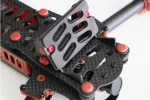
I fly the ImmersionRC Vortex FPV racing quadcopter and the Yi is mounted to a anti jello platform. (attachment)
And this video was recorded at 1080p 60fps with custom firmware and script.
Yes i did refocus the lens for it to be a bit sharper at distance.

I'm going to try all the different setting, thanks for all the advice on what everything does😀
 

Attachments

  • Recliner2.webp
    Recliner2.webp
    25.4 KB · Views: 97
Last edited:
i love that fpv racer!
so u use a flight cam for livepicture with glasses and the xiaomi for footages?
How long can you fly with xiaomi connected to lipo of the racer?
back to the xiaomi...custom firmware means the original bitrate!
You can try follow lines setting to autoexec.ash to test in 35mbits, makes the video clearer.
I think the lines are in the script i send you, delete only hashtacks in front of needed commands, like this:

#1920x1080 60 fps 35 mbps
writeb 0xC06CC426 0x03
writew 0xC05C1EE2 0x420C


...have fun flying quadcopter
 
Last edited:
Thanks, i love it to😀

But yeah i use the flight cam for live feed back to my goggles and use the Yi for recording the flight.
I do not have the Yi powered by the lipo of the quad but i can fly for 5 minutes, i could power the yi with my quad but i haven't done that yet because i need a power converter.

I have but the original 1,2,13Fw back on it and only run the script you gave me and tested some different settings and it's almost there for low light conditions🙂
Just need to test some more but man there is allready a big differance between the stock cam en how it is now with the script, love it!

This is how i have it now: ( Also i found a script on youtube and meaby you can do somting with it, it's in the attachment)

#video script by gente for 1.2.13 firmware

#2304x1296 30 fps 35mbps
#writeb 0xC06CC426 0x02
#writew 0xC05C1EB2 0x420C

#1920x1080 60 fps 35 mbps
writeb 0xC06CC426 0x03
writew 0xC05C1EE2 0x420C

#1920x1080 45 fps 35 mbps
#writeb 0xC06CC426 0x04
#writew 0xC05C1F12 0x420C

#1920x1080 30 fps 35 mbps
#writeb 0xC06CC426 0x06
#writew 0xC05C1F72 0x420C

#setting vibrance and saturation
t ia2 -adj ev 10 0 70 0 0 160 0

#shadow/highlight clipping adjustments
t ia2 -adj l_expo 163
t ia2 -adj autoknee 200

#set gamma level
t ia2 -adj gamma 160

#enable 1/13/14/34/38 scene modes: auto/landscape/portrait/through_glass/car_DV
t cal -sc 14

#noise reduction 0:no reduction(noisy but sharper)/16383:full noise reduction(no noise but less sharp)
t ia2 -adj tidx -1 1250 -1

#fix ae/awb/af/adj 0😱n 1😱ff
t ia2 -3a 1 1 0 1

#set file size to 4GB
sleep 3
writew 0xC03A8520 0x2004
sleep 1

#ready beep
t pwm 1 enable
sleep 1
t pwm 1 disable
 

Attachments

Last edited:
this script is also for sharpen, i tested it before and i mean it is only good for people who want edit sharpness via software.
This script is for another fw version so on not all adresses in that autoexec.ash would work.
I made you a script with your settings (only 3 lines more in script refer to coring.txt , i have modified for sharpness) for testing, extract and put both files (autoexec.ash and coring.txt) in root directory of microsd and before rename your old autoexec.ash!
Have fun...
 

Attachments

Big thanks for al the help and time!😀

I've put the old autoexec.ash file on to a other folder on my pc.
Do i still need to rename the file, if yes to what name?

And what is ISO?
Is it only for pictures or has it also influence on the recording quality?

Also i noticed that the last line of the script is not empty. Is this intended?
 
Last edited:
I cant give you the script you looking for but meaby i can help you with your PC.

What GPU do you have?
And what is the exact problem you have now when playing the video file you just recorded ?

I ask because i do not completely understand your question.
when recording movies in the 2k walk me to my PC as I would be let go in vacation, why ?? 🙂 I have the appropriate equipment and all was well in advance , and since today plays strange to me , maybe something with the drivers of the graphics card ?
 
Big thanks for al the help and time!😀

I've put the old autoexec.ash file on to a other folder on my pc.
Do i still need to rename the file, if yes to what name?

And what is ISO?
Is it only for pictures or has it also influence on the recording quality?

Also i noticed that the last line of the script is not empty. Is this intended?

...sorry you need an empty line at the end of script, you have to add a line with notepad++!
ISO is for pictures for exposure (sensitivity of a camera film) can fix it to a value. Iso 100/200 are for sunshine footages, higher values for darker scenes...
You only have to extract files and put both to root directory if microsd, the names i mean are ok: autoexec.ash and coring.txt must be the file names.
 
...sorry you need an empty line at the end of script, you have to add a line with notepad++!
ISO is for pictures for exposure (sensitivity of a camera film) can fix it to a value. Iso 100/200 are for sunshine footages, higher values for darker scenes...
You only have to extract files and put both to root directory if microsd, the names i mean are ok: autoexec.ash and coring.txt must be the file names.

Thanks, i just added a line to the script😉
So i'f i understand correctly, the ISO also have influence to not only pictures but also films?
 
Back
Top