BlackVue Elite 9 - Testing/Review - RCG

To follow up:

Bv replied to me;

**

1. Regarding Battery Protection

You are absolutely right that having flexibility with power management is crucial, especially for users with sophisticated setups like yours using large external battery packs.

The Battery Protection feature (encompassing the timer and voltage cut-off) is designed as a critical safeguard to prevent deep discharge, which can permanently damage not only the dash cam's internal battery but also, more importantly, your vehicle's main battery. We set default limits to protect the vast majority of users who power their cameras from their car's electrical system.

However, we understand that for users employing dedicated, high-capacity external power sources, these limitations can be restrictive. While the current firmware does not allow for a complete disablement of these protections, your request for this as a user-selectable option is completely valid and has been noted.

Our Feedback:
We will formally suggest your request to our product development and firmware engineering teams. While we cannot guarantee a timeline or specific outcome for any future update, customer input like yours is a key driver for our product evolution. For immediate use, we recommend setting the voltage cut-off to its lowest setting (e.g., 11.8V). This will minimize interference while maintaining a minimal safety net
 
Can anyone tell me the best place to get an elite 10 in the uk? I can’t find anywhere store selling it as yet
 
Thanks for the response 🙂 I just got myself one 👍
 
Can you recommend which SIM card to get which works best for good connection please? Also is the CM100LTE compatible with the elite 9/10
 
Can you recommend which SIM card to get which works best for good connection please? Also is the CM100LTE compatible with the elite 9/10
Any UK SIM works.
It depends on your data needs.
Have a look at uSwitch.com for SIM only deals with either no contract or 30 day contracts.
Then you can adjust if needed (up or down in price/usage).
They usually start from around £3.90/month and you get deals for comparing with uSwitch for either half price for so many months, or cashback.

For example; £3.90/month for 3GB with just a rolling 30 day contract and no price increases (spusu mobile - uses EE network)
Or £15/month for unlimited data with just a rolling 30 day contract and no price increases (ID Mobile - uses Three network)

 
www.Amazon.fr have it for sale with shipping to the UK for 14 euros
https://www.amazon.fr/gp/B0GCSH37Z5

@egonvdv also recommended;
They also ship to the UK.
Use discount code - UBERZONE - to get 5% off

for anyone else that might be interested: the amazon seller and the BV france website are the same company (MOOVIKA).
This is where i bought all my previous cameras as well, and now the Elite 10.
They are very good & trustworthy
 
Last edited:
for anyone lese that might be interested: the amazon seller and the BV france website are the same company (MOOVIKA).
This is where i bought all my previous cameras as well, and now the Elite 10.
They are very good & trustworthy
They also do good CPL filters for the BlackVue range too
 
To follow up:

Bv replied to me;

**

1. Regarding Battery Protection

You are absolutely right that having flexibility with power management is crucial, especially for users with sophisticated setups like yours using large external battery packs.

The Battery Protection feature (encompassing the timer and voltage cut-off) is designed as a critical safeguard to prevent deep discharge, which can permanently damage not only the dash cam's internal battery but also, more importantly, your vehicle's main battery. We set default limits to protect the vast majority of users who power their cameras from their car's electrical system.

However, we understand that for users employing dedicated, high-capacity external power sources, these limitations can be restrictive. While the current firmware does not allow for a complete disablement of these protections, your request for this as a user-selectable option is completely valid and has been noted.

Our Feedback:
We will formally suggest your request to our product development and firmware engineering teams. While we cannot guarantee a timeline or specific outcome for any future update, customer input like yours is a key driver for our product evolution. For immediate use, we recommend setting the voltage cut-off to its lowest setting (e.g., 11.8V). This will minimize interference while maintaining a minimal safety net
They said something similar to me as well. Since they keep adding features, maybe they will add it.
 
Looking at the Elite 9's 2K rear camera HDR footage compared to the Elite 10's 4K rear camera non-HDR footage, you can see how yellow the Elite 9's rear camera HDR footage can be.

The shrub on the left side of the image is very yellow looking in the Elite 9 rear camera footage. The Elite 10's rear camera footage has more realistic colors.

1776493445512.webp
 
Firmware v1.008 for the Elite 9 dash camera is now available via the BlackVue app. The BlackVue website does not show this update just yet.

[v1.008]
1. Added remote SD card format.
2. Improved time synchronization.
3. Added exFAT file system support.
4. Added Hong Kong and Ukrainian language support.
5. Improved system stability.

The BlackVue app had a recent update as well.

Android v4.24 (Release date: 2026-04-29)
iOS v4.20 (Release date : Apr 28, 2026)

• Added Audio Recording setting to Quick Settings
• Remote SD card format now available for select models
(Supported models : DR770X II / DR770X LTE / DR770X Box Pro / DR970X LTE Plus II / ELITE 8 / ELITE 9 / ELITE 10 / ELITE+ GOLD)
• Other bug fixes and system stability improvements
 
Hey guys I’m having a nightmare with my elite 9. My setup is as follows. Black bye battery fuse tapped into fuse box. Then other end into battery. Battery into front camera. Front camera into LTF Module.

Camera works fine when driving around doing what it should do and connecting to the cloud fine. Problem was noticed when I went into my house to try download some videos and the cloud was showing as not connected and wouldn’t.

When I got back int the car the cloud connected again. I spoke to blackvue and the asked me to check if the red light on the camera goes green which should indicate parking mode. It didn’t, after 5m the camera said parking mode but no green led from red. The around 5m after that all the lights went off which I assume was it losing its supply when the car (electric) finally shut its systems down. Which also confuses me as I thought the battery would just keep powering the unit. Bkackvire support closed for the weekend so didn’t have chance to carry on with the support
 
Hey guys I’m having a nightmare with my elite 9. My setup is as follows. Black bye battery fuse tapped into fuse box. Then other end into battery. Battery into front camera. Front camera into LTF Module.

Camera works fine when driving around doing what it should do and connecting to the cloud fine. Problem was noticed when I went into my house to try download some videos and the cloud was showing as not connected and wouldn’t.

When I got back int the car the cloud connected again. I spoke to blackvue and the asked me to check if the red light on the camera goes green which should indicate parking mode. It didn’t, after 5m the camera said parking mode but no green led from red. The around 5m after that all the lights went off which I assume was it losing its supply when the car (electric) finally shut its systems down. Which also confuses me as I thought the battery would just keep powering the unit. Bkackvire support closed for the weekend so didn’t have chance to carry on with the support
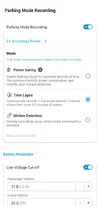
Sounds like you may have parking mode set to low power mode.
The camera goes in deep sleep when in parking mode - and try Cloud turns off to preserve power.

Change parking model option to time lapse instead and see if that changes your issue.

I have to do this when I plan on downloading footage, then remotely change the settings back to low power mode when I'm finished, so the camera goes back to sleep.

I've requested a time delayed low power parking mode (after 30 minutes of being parked for example), or a hybrid parking mode similar to what Viofo implemented - but they've just added it to their list of things to look into.
 

Attachments

  • Screenshot_20260501-230627.webp
    Screenshot_20260501-230627.webp
    63.5 KB · Views: 2
Hey guys I’m having a nightmare with my elite 9. My setup is as follows. Black bye battery fuse tapped into fuse box. Then other end into battery. Battery into front camera. Front camera into LTF Module.

Camera works fine when driving around doing what it should do and connecting to the cloud fine. Problem was noticed when I went into my house to try download some videos and the cloud was showing as not connected and wouldn’t.

When I got back int the car the cloud connected again. I spoke to blackvue and the asked me to check if the red light on the camera goes green which should indicate parking mode. It didn’t, after 5m the camera said parking mode but no green led from red. The around 5m after that all the lights went off which I assume was it losing its supply when the car (electric) finally shut its systems down. Which also confuses me as I thought the battery would just keep powering the unit. Bkackvire support closed for the weekend so didn’t have chance to carry on with the support
As @Dan-UK1415 mentioned, you most likely have the parking mode configured for power saving parking mode. I explain the manner in which that parking mode works back in Post #13 of this thread.

When the vehicle and/or battery pack ACC power provided to the dash camera is turned off, the dash camera will enter an initial monitoring/recording state for 3-minutes. During that 3-minute period it is creates videos [ignoring impacts]. After 3-minutes, the dash camera goes into power saving mode. If the CM100G LTE connectivity module is connected to it, that also shuts down when the dash camera enters power saving mode.

The dash camera waits for an impact event to awaken it again. It will start recording 1-minutes video(s) within 1-second of the impact being detected. If the CM100G LTE module is present, the dash camera powers up the LTE module and a BlackVue Cloud connection is established. That's when a push notification and any file uploads to the cloud take place.

After those video(s) finish recording, the dash camera goes into a 4-minute monitoring state, but this time it's not creating any video files. The LTE module remains powered at during this time period. If qualifying impact event takes place during that 4-minute monitoring period, the dash camera will create 1-minute buffered video(s) [10-to-12 seconds before / 50-to-48 seconds after]. When the 4-minute monitoring period finishes, the dash camera returns to power saving parking mode waiting for another impact event.

1777673196244.webp
 
As @Dan-UK1415 mentioned, you most likely have the parking mode configured for power saving parking mode. I explain the manner in which that parking mode works back in Post #13 of this thread.

When the vehicle and/or battery pack ACC power provided to the dash camera is turned off, the dash camera will enter an initial monitoring/recording state for 3-minutes. During that 3-minute period it is creates videos [ignoring impacts]. After 3-minutes, the dash camera goes into power saving mode. If the CM100G LTE connectivity module is connected to it, that also shuts down when the dash camera enters power saving mode.

The dash camera waits for an impact event to awaken it again. It will start recording 1-minutes video(s) within 1-second of the impact being detected. If the CM100G LTE module is present, the dash camera powers up the LTE module and a BlackVue Cloud connection is established. That's when a push notification and any file uploads to the cloud take place.

After those video(s) finish recording, the dash camera goes into a 4-minute monitoring state, but this time it's not creating any video files. The LTE module remains powered at during this time period. If qualifying impact event takes place during that 4-minute monitoring period, the dash camera will create 1-minute buffered video(s) [10-to-12 seconds before / 50-to-48 seconds after]. When the 4-minute monitoring period finishes, the dash camera returns to power saving parking mode waiting for another impact event.

View attachment 91298
Thanks for the responses I do indeed have power saving mode on. What was throwing me was that blackvue tech support told me that when in parking mode the red recoding light should be green (unless detection or recording then goes red then back green once recording finished. I hear the cam say it’s done into parking mode but no green light. Maybe this is because of power saving mode also, not sure
 
Also I have to say I am not impressed so far. The cloud connectivity is just awful. It is hit and miss weather or not I can go into live view mode or playback videos. The are isa great signal so should have no issues in that respect. The big selling point for me for this cam was being able to remotely monitor if needed and it is just not performing. Firmware is all upto date
 
Check your SIM data connection and also what status the camera is in.

The Cloud/remote view function turns off when in low power parking mode, to preserve power.
If you change the parking mode setting to time lapse or motion detect parking mode, then cloud connection remains turned on all the time, but battery drains quicker.
 
Check your SIM data connection and also what status the camera is in.

The Cloud/remote view function turns off when in low power parking mode, to preserve power.
If you change the parking mode setting to time lapse or motion detect parking mode, then cloud connection remains turned on all the time, but battery drains quicker.
Yes I have it on motion detected and same issues
 
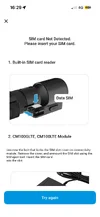
Now getting this constantly when it was working and connected..this thing is so glitchy I wish I’d have got another now
 

Attachments

  • IMG_6921.webp
    IMG_6921.webp
    55.8 KB · Views: 3
Back
Top